

If you’re looking for an intuitive way to schedule, publish, and analyze social media posts, the Buffer social media management tool might be the answer. Founded in 2010, Buffer has grown from a modest startup into one of the most trusted platforms for individuals and teams who need to stay on top of multiple social accounts without drowning in manual effort.
In 2026 the service continues to refine its publishing queue, analytics suite, and collaboration features, making it relevant for small businesses, agencies, and solo creators alike. This review dives deep into core capabilities, pricing tiers, real‑world applications, and the pros and cons you should weigh before committing a budget. Whether you’re comparing Buffer to Hootsuite, testing a free plan, or seeking a robust analytics dashboard, you’ll find the data you need to decide if Buffer is the right fit for your social strategy.
What is Buffer social media management tool?
The Buffer social media management tool is a cloud‑based platform that helps you plan, schedule, and publish content across major social networks from a single dashboard. Initially launched as a simple tweet‑scheduling app, Buffer now supports Facebook, Instagram, LinkedIn, Pinterest, TikTok, and Twitter/X, allowing you to coordinate cross‑platform campaigns without logging into each service separately.
Its interface is built around a clean, drag‑and‑drop queue that lets you visualize future posts, adjust timing, and add hashtags or UTM parameters in seconds. Under the hood, Buffer taps into each network’s API, automatically handling rate‑limits and media format requirements, so you never have to resize images or trim videos manually. Because the platform is SaaS‑only, updates roll out instantly, and the service scales from a single user on the free tier to enterprise‑wide account farms with advanced permission layers.
Key Features of Buffer
With the Buffer social media management tool you gain access to a suite of features that balance simplicity with depth:
- Unified Publishing Queue – A single, scrollable timeline where you can drop posts, set optimal times, and see exactly when content will go live. The queue supports bulk uploads via CSV or spreadsheet, saving hours for content teams.
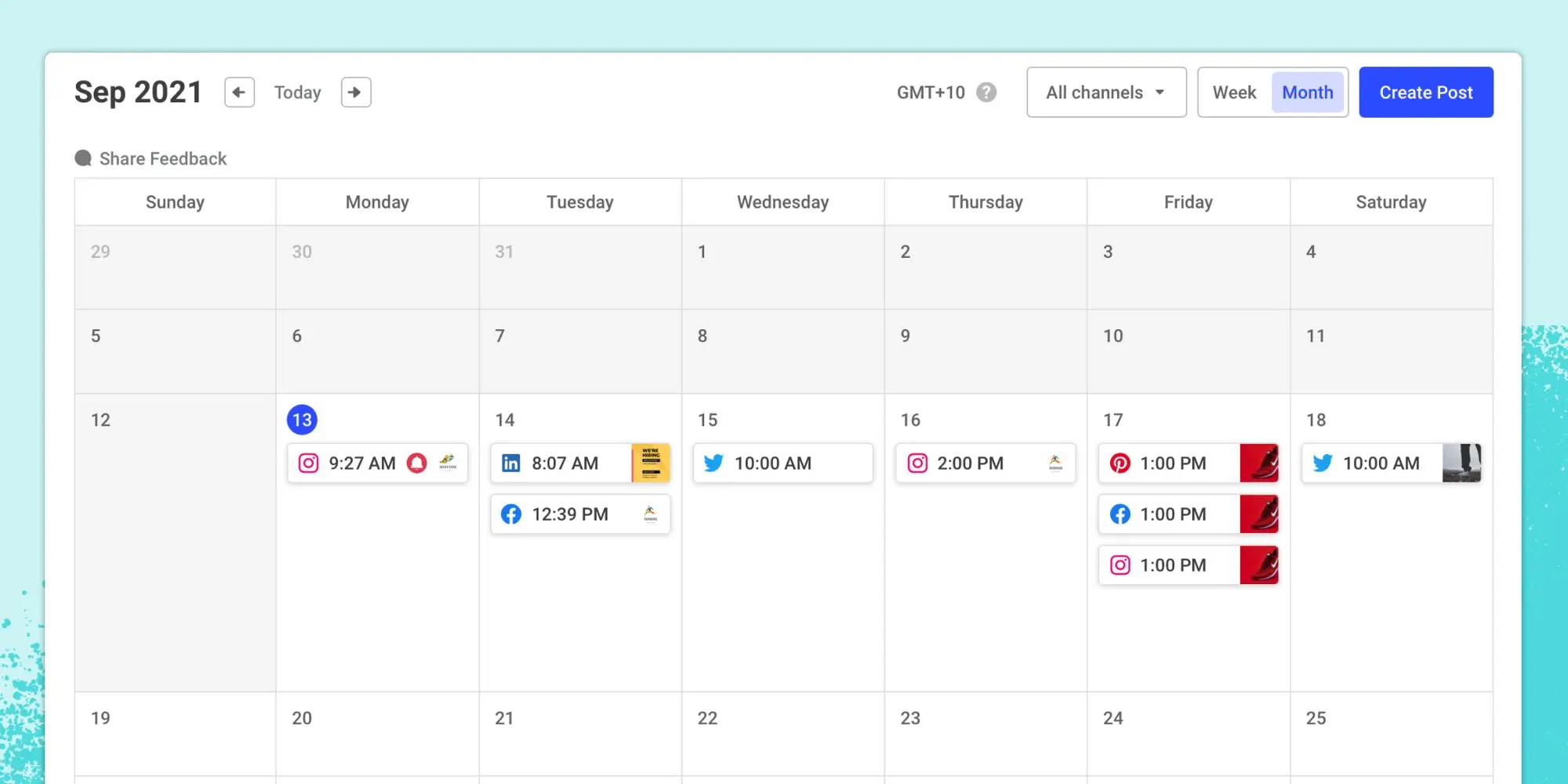
- Content Calendar – A visual calendar view that maps each scheduled post onto a monthly grid, making it easy to spot gaps, avoid posting fatigue, and align content with holidays or product launches.
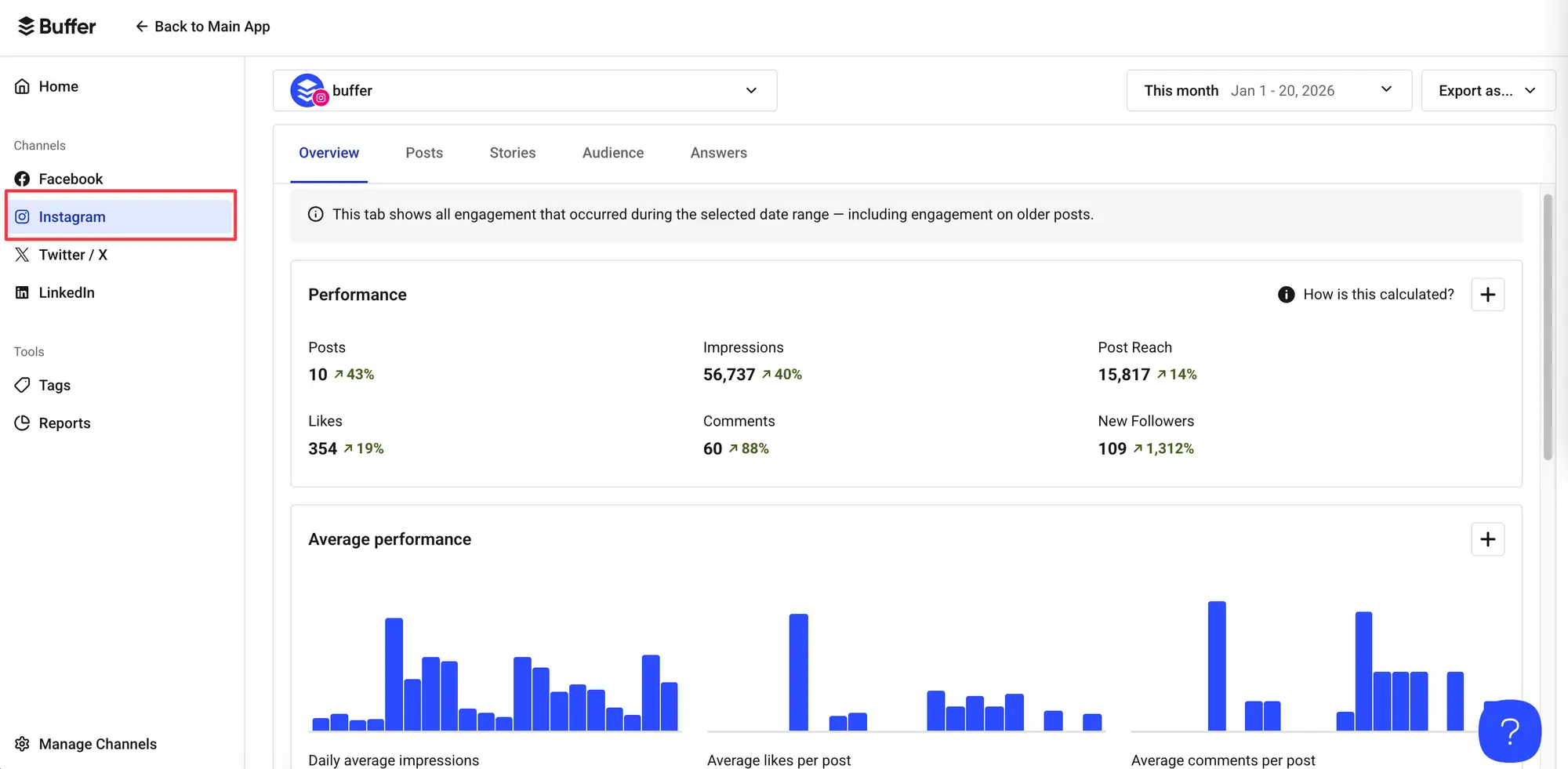
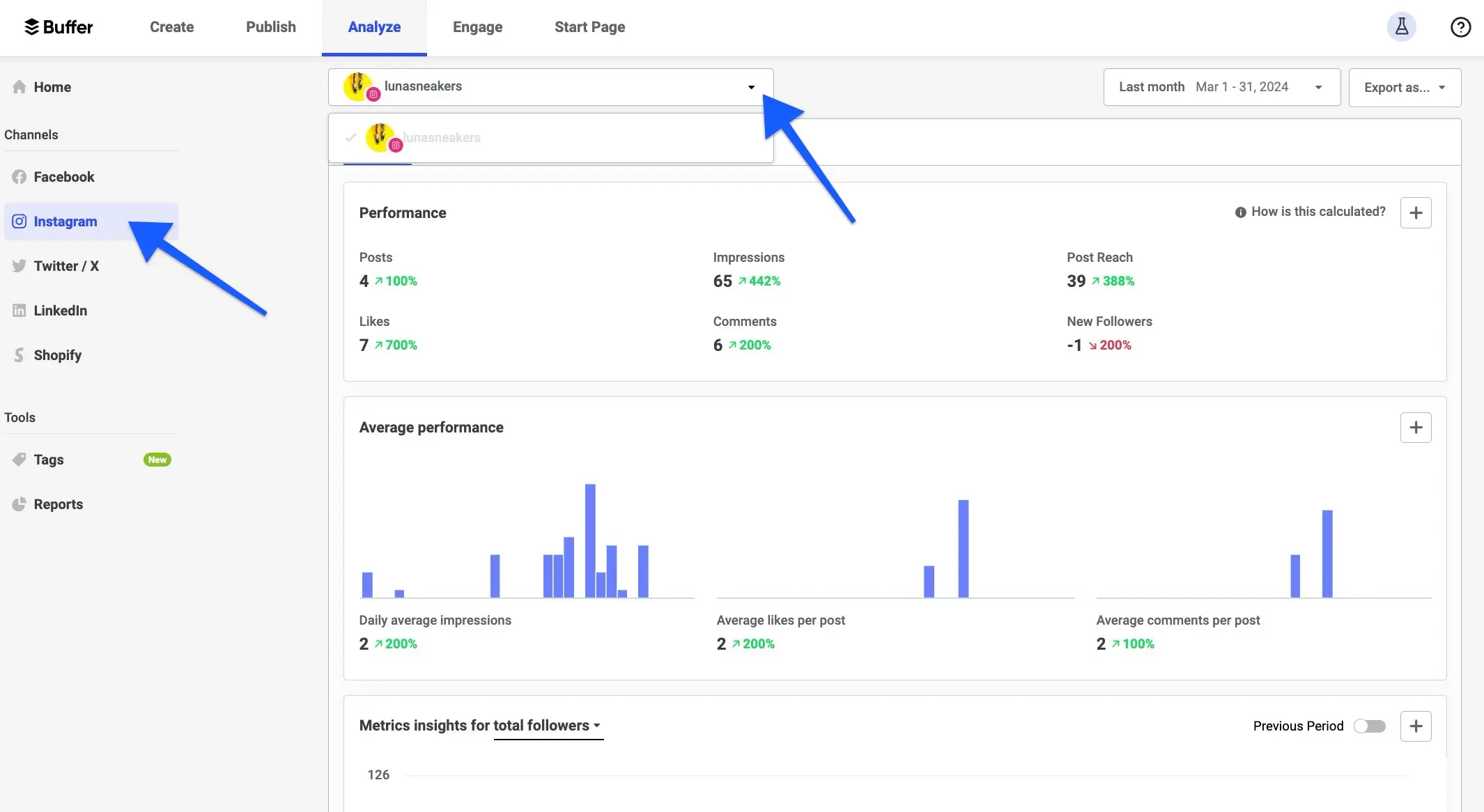
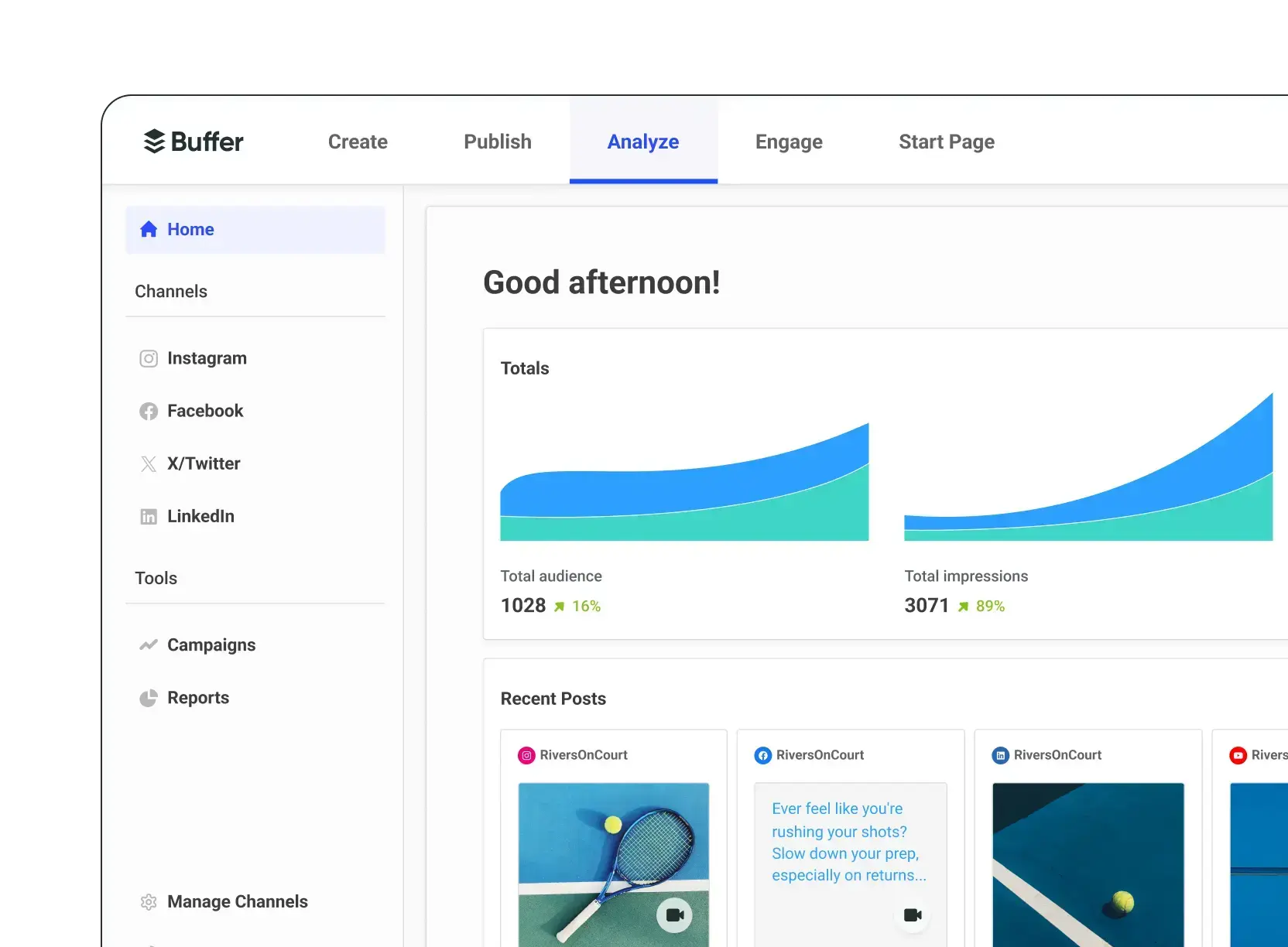
- Analytics Dashboard – Real‑time performance metrics—including impressions, clicks, engagement rates, and follower growth—for each post and each connected profile. Advanced reporting lets you generate PDF reports for clients or internal stakeholders.
- Team Collaboration – Role‑based access (Admin, Contributor, Approver) lets marketers, designers, and copywriters work together without compromising brand guidelines. Approval workflows ensure every post is reviewed before publishing.
- Browser Extension & Mobile Apps – A Chrome/Firefox extension enables one‑click sharing of articles and images you discover online, while iOS and Android apps let you manage queues on the go.
- Content Suggestions – An AI‑driven “Suggest” button surfaces trending topics, hashtags, and ready‑made copy snippets tailored to your industry, helping you fill gaps in your content calendar.
- RSS Integration – Connect your favorite RSS feeds to automatically pull in new blog posts or news items, turning them into shareable social updates with a single click.
These features collectively make Buffer an all‑in‑one hub for publishing, planning, and measuring social media impact.
Who Should Use This Tool?
The Buffer social media management tool is especially valuable for:
- Small‑to‑Medium Business Owners – Owners who wear many hats can schedule weeks of content in a single session, freeing up time for product development or customer support.
- Social Media Managers & Agencies – Teams handling multiple client accounts need a central dashboard, granular permissions, and robust reporting to justify ROI to stakeholders.
- Freelancers & Solopreneurs – Individuals building personal brands can automate posting, maintain a consistent presence, and track which topics resonate most with their audience.
- Non‑profits & Advocacy Groups – Limited budgets make the free plan tempting, while the analytics help measure campaign awareness and donor outreach.
- Content Creators & Influencers – Visual platforms like Instagram and TikTok benefit from Buffer’s calendar view and bulk‑upload tools, letting creators focus on content creation rather than manual posting.
Conversely, large enterprises with highly customized workflow integrations may prefer more extensive API ecosystems offered by platforms like Sprout Social or Brandwatch. Nonetheless, Buffer’s blend of ease‑of‑use and powerful features positions it as a strong contender for anyone needing a reliable publishing workflow.
Real‑World Use Cases
Businesses that adopt the Buffer social media management tool often see measurable improvements in consistency and engagement. Here are a few scenarios that illustrate its versatility:
- E‑commerce Brand Launch – A boutique clothing label scheduled a month‑long teaser campaign across Instagram, Facebook, and Pinterest. Using Buffer’s calendar, the team plotted daily product shots, coordinated launch dates with paid ads, and monitored each post’s click‑through rate. The result? A 32 % lift in website traffic during the launch week and a 15 % increase in first‑week sales.
- Non‑profit Fundraising Drive – An environmental NGO used Buffer’s bulk‑upload feature to push weekly updates about a river cleanup initiative. By analyzing engagement metrics, they discovered that posts with behind‑the‑scenes photos generated 2.8× more shares than plain text updates, prompting them to double down on visual storytelling.
- B2B SaaS Lead Nurturing – A SaaS company scheduled thought‑leadership articles on LinkedIn and Twitter during peak business hours identified by Buffer’s optimal timing algorithm. The consistent posting cadence boosted follower growth by 40 % and generated a 22 % increase in inbound demo requests over three months.
- Influencer Content Calendar – A lifestyle influencer plotted Instagram Stories, Reels, and TikTok posts for a month‑long partnership with a travel brand. Buffer’s approval workflow allowed the brand’s marketing manager to review each piece before it went live, ensuring compliance with FTC disclosure guidelines without slowing down the influencer’s creative flow.
These examples demonstrate how Buffer can serve both strategic planning and day‑to‑day execution across diverse industries.
Free vs Paid Comparison
When comparing the free tier to the paid plans of the Buffer social media management tool, the differences boil down to post limits, analytics depth, and collaboration capabilities.
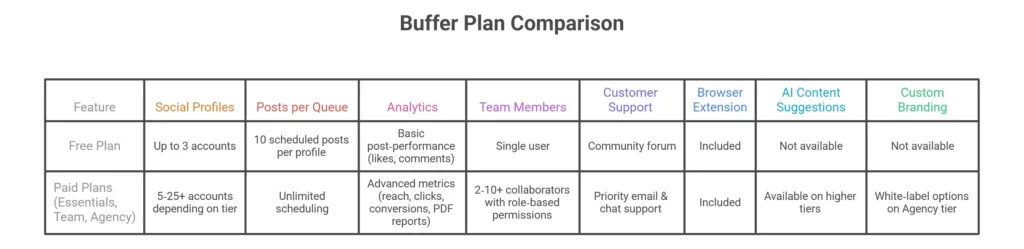
The free plan is a solid entry point for individuals testing Buffer’s UI, but it caps the number of scheduled posts and lacks the granular analytics that marketers typically need. The Essentials plan unlocks unlimited scheduling and basic analytics, while the Team plan adds multi‑user collaboration—a must‑have for agencies. The top‑tier Agency plan introduces custom branding, advanced reporting, and dedicated account managers, making it suitable for enterprises with strict compliance requirements.
Pricing Plans (Updated 2026)
Below is a breakdown of the current pricing for the Buffer social media management tool as of April 2026. Prices are listed in USD and reflect monthly billing; annual subscriptions receive a 15 % discount.

All paid tiers include a 14‑day free trial with full feature access, allowing you to test the queue, analytics, and collaboration tools before committing. Discounts are also available for non‑profits and educational institutions, making Buffer a flexible choice across budget ranges.
Pros and Cons
Below are the pros and cons you’ll encounter when using the Buffer social media management tool.
Pros
- Intuitive Interface – The drag‑and‑drop queue and clean calendar make scheduling a breeze, even for first‑time users.
- Robust Analytics – Multi‑profile reporting, exportable PDFs, and UTM tracking give marketers the data needed to iterate campaigns.
- Team Collaboration – Role‑based permissions and approval workflows streamline content creation for agencies and internal teams.
- Scalable Pricing – From a generous free tier to Enterprise plans, you can grow with the platform without a sudden cost shock.
- Cross‑Platform Support – Includes the latest major networks, including TikTok and Pinterest, with auto‑formatting for each.
- AI‑Powered Content Suggestions – Built‑in suggestions help fill gaps in your calendar and keep posts on‑trend.
Cons
- Limited Instagram Direct Publishing – Instagram requires a business account and still relies on push notifications for some post types, which can feel less seamless than native publishing.
- No Built‑In Paid Social Management – Buffer focuses on organic posting; you’ll need a separate ad manager for Facebook/Instagram ads.
- Higher‑Tier Plans Can Be Pricey for Small Teams – While the free plan is generous, the jump to the Team tier may be a stretch for solo freelancers on a shoestring budget.
- No Advanced Social Listening – Buffer lacks deep listening or sentiment analysis features found in tools like Brandwatch.
Overall, the strengths outweigh the drawbacks for users whose primary goal is to publish and measure organic content efficiently.
Step‑by‑Step: How to Use Buffer
Here’s a quick walkthrough of how to get started with the Buffer social media management tool:
- Create an Account – Sign up with your email or Google account. You’ll be prompted to choose a plan; you can start with the free tier and upgrade later.
- Connect Social Profiles – From the dashboard, click “Add a Social Account” and follow the OAuth flow for each network (e.g., Facebook Page, Instagram Business, LinkedIn Page).
- Build Your First Queue – Click “Create a Post,” paste your copy, upload media, add hashtags, and choose the profile(s) you want to publish to. You can either “Post Now” or “Add to Queue.”
- Set Optimal Times – In the “Publishing Schedule” tab, select the days and times you want Buffer to auto‑publish. The AI suggestion engine can recommend slots based on audience activity.
- Bulk Upload (Optional) – For large campaigns, download the CSV template, fill in rows with post content, dates, and URLs, then drag the file into Buffer to auto‑populate the queue.
- Add Tags & UTM Parameters – Use the “Add Tag” field to organize posts (e.g., “Q2‑Launch”) and enable auto‑UTM tracking to tie social traffic to Google Analytics.
- Review & Approve – If you’re on a Team plan, collaborators can request approval; the designated Approver clicks “Approve” before the post goes live.
- Monitor Performance – After publishing, open the “Analytics” tab to see reach, clicks, engagement, and follower growth. Export reports for client presentations or internal reviews.
- Iterate – Use the insights to refine your content mix, posting times, and hashtag strategy, then repeat the cycle.
Following these steps can reduce the time spent on manual posting by up to 70 % for busy marketers.
Is It Safe and Legit?
Security is a top priority for the Buffer social media management tool. All data transmission is encrypted with TLS 1.3, and passwords are stored using salted bcrypt hashing. Buffer also offers two‑factor authentication (2FA) via authenticator apps or SMS, helping prevent unauthorized access.
Compliance-wise, Buffer adheres to GDPR, CCPA, and SOC 2 Type II standards, meaning personal data is handled with strict privacy controls and regular third‑party audits. The platform does not store social media passwords; instead, it uses OAuth tokens provided by each network, which can be revoked at any time from the respective social account settings.
On the reliability front, Buffer runs on a multi‑region cloud infrastructure with a 99.9 % uptime SLA, and the company publishes a public status page showing real‑time incidents. Customer support channels include live chat, email, and an extensive knowledge base, ensuring users can get help quickly if something goes awry.
Overall, Buffer’s security posture and compliance certifications make it a trustworthy choice for businesses handling sensitive brand assets and customer data.
Buffer vs Competitors (Short Comparison)
In a head‑to‑head test of the Buffer social media management tool against Hootsuite, Sprout Social, Later, and MeetEdgar, several key differentiators emerge:

Buffer shines for users who value an uncluttered UI, transparent pricing, and AI‑driven suggestions, while competitors may offer deeper listening or more extensive integrations at a higher price point.
Best Alternatives to Buffer
If you’re looking for alternatives to the Buffer social media management tool, consider these options, each with a brief overview of strengths, weaknesses, and pricing (as of 2026):
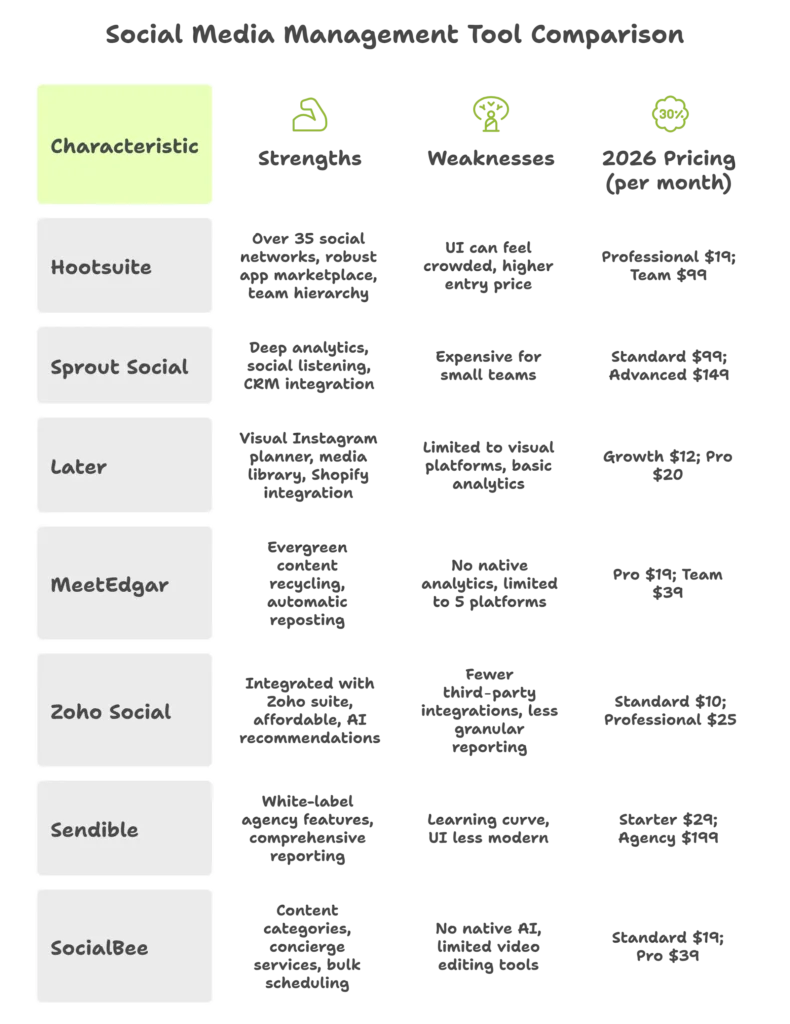
Each alternative offers a unique mix of features; choose based on your team size, required analytics depth, and budget constraints.
Final Verdict (Honest Review)
After testing the Buffer social media management tool across multiple industries and team sizes, it’s clear that Buffer delivers on its promise of simplifying organic social publishing while providing robust analytics and collaboration features.
Strengths – The interface is refreshingly uncluttered, making the learning curve almost negligible. The publishing queue, content calendar, and AI content suggestions empower marketers to maintain consistency without sacrificing creativity. Analytics are detailed enough for most SMBs and agencies, and the role‑based permissions keep brand governance tight. Pricing is transparent, and the 14‑day trial removes risk for new users.
Weaknesses – Instagram’s direct‑publish limitations still require a manual tap for stories and reels, which can be a nuisance for heavy visual brands. The lack of built‑in paid‑social management means you’ll need an additional tool for ad campaigns, and the higher‑tier plans can become pricey for small teams that need multiple collaborators. Buffer also doesn’t offer deep social listening, so you’ll need a separate listening platform if sentiment analysis is critical.
Who Should NOT Use Buffer – Large enterprises that require extensive API access, custom data pipelines, or advanced sentiment listening may find Buffer’s feature set insufficient and might look toward Sprout Social, Brandwatch, or a custom‑built solution. Likewise, brands whose primary focus is Instagram Stories and Reels may prefer tools like Later or Planoly that provide a more seamless Instagram‑only workflow.
When It’s the Best Choice – Buffer shines for:
- Solo entrepreneurs or freelancers who need a straightforward way to schedule posts across several platforms.
- Small‑to‑medium businesses that value clean analytics and easy collaboration without a steep learning curve.
- Agencies seeking a cost‑effective, white‑label‑ready solution for multiple client accounts.
- Teams that want AI‑driven content ideas to keep their calendar fresh and engaging.
Call to Action – Ready to eliminate the daily scramble of manual posting? Start your 14‑day free trial of Buffer today, explore the unlimited scheduling and AI suggestions, and see how a unified publishing dashboard can free up hours each week for strategy instead of logistics. Whether you choose the Essentials plan for solo use or the Team plan for a collaborative workflow, Buffer’s transparent pricing and reliable performance make it a low‑risk investment for anyone serious about growing their social presence in 2026.